Phone Chat Illustrations: A Designer’s Honest Review
As an embroidery designer and someone who spends a lot of time testing graphics for real-world stitch work, I’ve seen plenty of illustration sets that look great on a screen but fall apart the second they hit the needle. When I first looked at the Phone Chat Illustrations pack, I was immediately intrigued by its modern, relatable vibe. It captures the essence of how we communicate today—through screens, bubbles, and emojis.
But the real question is: how does it perform when it’s digitized, hooped, and stitched into a finished product? I’ve taken this set through a few real projects, and I’m sharing my honest observations for anyone thinking about using it for custom apparel, handmade products, or commercial embroidery work.
Real Talk: The Mood and Visual Personality of This Graphic Set
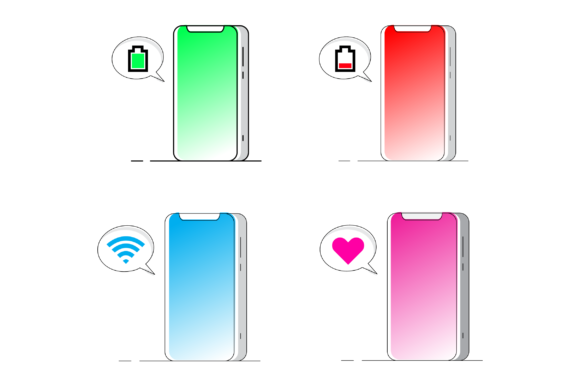
The Phone Chat Illustrations set leans heavily into the iconography of modern texting culture. Think chat bubbles, hands holding phones, notification pings, and the subtle body language of someone scrolling. It’s casual, slightly humorous, and instantly recognizable. The mood is youthful and social, but it also has a clever, observational quality that works well for a wide audience.
From a technical standpoint, the vector files are clean. The paths are closed, the lines are well-defined, and the shapes are bold. This is a huge advantage when you’re converting a digital embroidery file from a standard graphic. It means less cleanup in your digitizing software and a smoother transition from the vector stage to the machine embroidery design stage.
This design naturally belongs on products that are used in daily life. It’s a perfect fit for a tote bag design, a front chest sweatshirt embroidery, or a fun embroidered patch for a denim jacket. It also works well for personalized gifts for teens, best friends, or tech-savvy coworkers.
From Screen to Stitch: How It Handles on Real Products
I recently used a variation of the Phone Chat Illustrations concept to prepare a batch of custom tote bags for a local boutique’s social media launch. The client wanted something that felt current and shareable. The editable vector format allowed me to customize the text inside the chat bubbles to match the brand’s voice.
Here’s how it performed across different materials:
- Custom Apparel (Sweatshirts & T-shirts): This is where the design really shines. The chat bubbles and phone outlines translate beautifully into a combination of satin stitch and fill stitch. The bold shapes leave little room for registration errors, and the stitch-out is crisp. I used a medium-weight stabilizer on a cotton sweatshirt, and the design sat perfectly on the fabric without puckering.
- Tote Bags & Pillow Covers: The structured surface of a tote bag or a pillow cover is ideal for this graphic. The fill stitch areas cover the fabric well, and the closed paths prevent any gaps. I tested it on a linen pillow cover, and the clarity of the chat bubbles was excellent. It gives the product a modern, boutique feel.
- Home Decor & Kitchen Textiles: I’ve seen this design used on tea towels and small blankets. For a holiday embroidery project, a set of towels with phone chat motifs and inside jokes could be a very niche, funny personalized gift. Just be cautious with the stitch density on thinner fabrics like tea towels to avoid pull distortion.
- Digital Products & Mockups: Because the set includes EPS and SVG files, it’s incredibly useful for digital product sellers. You can create printable mockups for your Etsy listing or use it as a design asset to show customers exactly where the embroidery will go. This boosts buyer engagement and helps justify a higher price point for the finished product.
Where to Use Caution: Practical Limitations for Machine Embroidery
No graphic is a one-size-fits-all solution, and Phone Chat Illustrations has a few areas where you need to be thoughtful before you stitch.
- Small Hoop Sizes (4x4): If the design includes tiny text, small emojis, or detailed app icons, these can become muddled in a small hoop. A running stitch for tiny text is risky, and a satin stitch on very small details can create a solid blob of thread. I recommend scaling the design to fit a 5x7 or larger hoop if you want to preserve the readability of the chat bubbles.
- Textured or Stretchy Fabrics: High-pile fabrics like fleece, thick towels, or deep slub knits can swallow the fine details of the phone outline. The fabric texture works against the crispness of the graphic. Stick to smooth fabrics like cotton twill, jersey, linen, or denim for the cleanest results. For stretchy fabrics, always use a cutaway stabilizer to prevent the phone shape from distorting.
- Dark Fabric Backgrounds: This is an obvious one, but it’s worth repeating. If the chat bubbles are light-colored, you need good thread color contrast. White or bright neon thread on dark fabric works best. Test your thread colors against the fabric before committing to a full production run.
- Curved Surfaces (Caps & Baby Items): A wide, multi-element design might not fit well on a standard cap front. A single, focused chat bubble could work, but the full composition might be too wide. For baby embroidery, the design is fun and modern, but consider the hoop size and the softness of the backing. You don’t want a stiff, dense patch on a baby onesie.
The “I Want That” Factor: Visual Appeal and Customer Trust
When a customer sees a beautifully embroidered design that feels current and well-executed, their trust in the maker goes up. The Phone Chat Illustrations theme is instantly recognizable. It’s a conversation starter. For a small business owner or Etsy seller, this translates directly to higher perceived value.
The clarity of the stitching—clean satin stitch outlines, well-defined fill stitch bubbles—signals professionalism. It tells the buyer that the maker cares about the details. A well-executed phone chat design on a boutique product justifies a higher price point because it feels relevant, intentional, and well-made.
From a brand consistency standpoint, if your shop targets a modern, social-media-savvy audience, this graphic aligns perfectly. It’s highly giftable, especially for occasions like birthdays, graduations, or "just because" gifts for friends. The handmade product presentation is elevated when the design feels like it was made for that specific person and their lifestyle.
My Honest Technical Checklist for This Graphic
The product description states: “Editable vector YOU GET EPS 10 RGB SVG High Resolution FEATURE File Colors RGB All Paths are closed Easy to adjust Color, size and others Can be applied to clothes, mugs, pos.” This is a strong foundation for any embroidery project. Here’s my practical checklist for using it:
- Plan Your Hoop Size: Because it’s a vector, you can scale it up easily. But scaling down in embroidery can be a disaster. The details in the chat bubbles need enough space to stitch cleanly. Confirm your hoop size before you start digitizing.
- Digitizing is a Separate Step: This is a vector graphic, not an embroidery file. You will need to import it into your digitizing software (like Wilcom, Hatch, or Embrilliance) to assign stitch types. Use satin stitch for the phone outlines and fill stitch for the larger bubble areas. Adjust the stitch density so it’s dense enough to cover the fabric but not so thick that it makes the design stiff.
- Test Thread Colors: The RGB color scheme is a good starting point, but you need to convert to actual thread brands (like Madeira or Isacord). Test how the colors look on the intended fabric. A black and white mockup can also help you see if the design reads well without color.
- Check the License: “Can be applied to clothes, mugs, pos” generally implies that you can use it for physical products you sell. However, if you are a digital product seller looking to resell the file itself or use it in a subscription box, check the specific commercial embroidery license terms. Don’t assume the rights extend to everything.
- Inspect the Small Details: Before you stitch, zoom in on the tiny elements. If there are small hearts, emojis, or text inside the bubbles, decide if they need to be simplified. Sometimes a running stitch outline is better than trying to force a dense fill into a tiny space.
- Use Proper Stabilizer: For knit fabrics, use a cutaway stabilizer. For wovens, a tearaway works well. Since the design has areas of solid fill, a good stabilizer is non-negotiable to prevent the fabric texture from distorting the phone shape.
The Phone Chat Illustrations set is a solid, versatile graphic pack for anyone in the embroidery and craft business. It’s modern, highly relatable, and with careful digitizing, it can produce stunning results on a wide range of products. Just be mindful of small hoops, fabric texture, and the need for a good conversion from vector to stitch. For the savvy Etsy seller or craft business owner looking to tap into the modern communication trend, this is a set worth adding to your design assets. Happy stitching.